TDD Analyzer: Building a Static RAG Architecture for Enterprise Documentation
Why deterministic pattern extraction, human-in-the-loop YAML enrichment, hybrid template guardrails, and single-call LLM prose enhancement outperform vector-database RAG for structured Technical Design Documents.
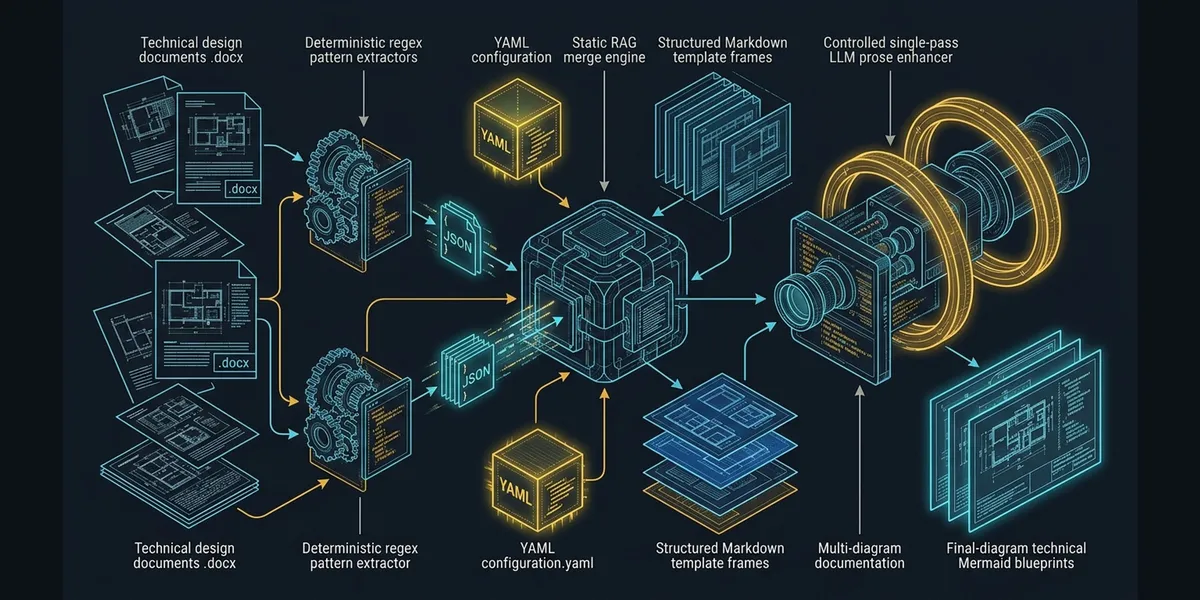
In modern AI engineering, Retrieval-Augmented Generation (RAG) has become the default reflex for grounding LLMs with domain-specific knowledge. But what if your use case does not need the complexity of vector databases, embeddings, and semantic search? What if your source documents are enterprise Technical Design Documents (TDDs) with predictable structure and your goal is deterministic batch documentation synthesis rather than interactive Q&A?
TDD Analyzer implements a Static RAG (Manual RAG) architecture built for generating comprehensive, internally consistent enterprise documentation from scattered Word design specs.
1. The Hard Part: Why Vector RAG Struggles with Documentation Generation
Organizations with complex enterprise integration landscapes frequently have technical specifications scattered across dozens of Word (.docx) TDDs covering:
- Integration patterns and data flows
- API specifications (
REST,SOAP, and file-based batch interfaces) - Database schemas, staging tables, and watermarks
- Error handling procedures and batch orchestration configurations
Traditional vector-based RAG systems excel at interactive Q&A, yet routinely break down during full-document synthesis for five structural reasons:
- Vector Search Returns Fragments: Semantic chunking retrieves isolated paragraphs without preserving how entities relate across an entire system.
- Loss of Document Hierarchy: Embeddings capture local similarity while destroying the structural link between section headers, payload schemas, and integration IDs.
- Hallucination Under Partial Context: Missing a chunk forces the LLM to “fill in gaps” with plausible-sounding—but fabricated—endpoint names or batch schedules.
- Cross-Section Consistency Failures: Integration names, API routes, and staging tables must match 100% identically between architecture diagrams, data-flow sequences, and API catalog tables.
- Latency and Token Cost: Pushing 50+ scattered design documents through embedding pipelines and chained retrieval calls inflates both latency and API cost.
2. The Static RAG Architecture: Separation of Facts from Prose
Instead of chunking documents into a vector database at runtime, TDD Analyzer pre-computes every required fact deterministically before invoking an LLM:
| Architectural Dimension | Traditional Vector RAG | Static RAG (TDD Analyzer) |
|---|---|---|
| Knowledge Store | Vector database & embeddings | Deterministic JSON + structured YAML (MERGED_DATA.yaml) |
| Extraction Mechanism | Chunking & runtime semantic similarity | Regex + AST/heuristic pattern extractors |
| Structural Control | Free-form prompt assembly | Master Markdown templates (DOCUMENT_TEMPLATE.md) + placeholders |
| Context Assembly | Dynamic top-$k$ retrieval | Pre-computed, complete factual payload + human YAML overrides |
| Execution Mode | Interactive multi-turn Q&A | Reproducible batch synthesis via single guarded LLM pass |
---
config:
  layout: elk
---
flowchart TB
    %% title: Static RAG Pipeline: Separation of Facts from Prose
    classDef step1 fill:#EFF6FF,stroke:#2563EB,stroke-width:2px,color:#1E3A8A
    classDef step2 fill:#ECFDF5,stroke:#059669,stroke-width:2px,color:#064E3B
    classDef step3 fill:#FFFBEB,stroke:#D97706,stroke-width:2px,color:#78350F
    classDef step4 fill:#F5F3FF,stroke:#7C3AED,stroke-width:2px,color:#4C1D95

    subgraph Step1["Step 1: Deterministic Extraction"]
        DOCS["Word Documents<br/>(*.docx)"]:::step1
        EXT["Pattern Extractors<br/>(Schema, API, ESS, BIP)"]:::step1
        JSON[("Extraction JSON<br/>Structured Facts")]:::step1
        DOCS e1@--> EXT
        EXT e2@--> JSON
    end

    subgraph Step2["Step 2: Merge & Human Enrichment"]
        CTX["User Context<br/>(context-settings.yaml)"]:::step2
        MERGE["Merge Engine<br/>(Explicit Conflict Resolution)"]:::step2
        YAML[("Merged Data<br/>(MERGED_DATA.yaml)")]:::step2
        JSON e3@--> MERGE
        CTX --> MERGE
        MERGE e4@--> YAML
    end

    subgraph Step3["Step 3: Hybrid Template Generation"]
        TPL["Templates<br/>(DOCUMENT_TEMPLATE.md + NARRATIVE_CONTEXT.md)"]:::step3
        GEN["Template Engine<br/>(Factual + Narrative Placeholders)"]:::step3
        DRAFT["Draft Document + Prompts<br/>(drafts/DRAFT.md)"]:::step3
        YAML e5@--> GEN
        TPL --> GEN
        GEN e6@--> DRAFT
    end

    subgraph Step4["Step 4: Guardrailed LLM Enhancement"]
        LLM["Configurable LLM Client<br/>(llm-settings.yaml)"]:::step4
        FINAL["Final Architecture Spec<br/>(1,400+ Lines · 12+ Mermaid Diagrams)"]:::step4
        DRAFT e7@--> LLM
        LLM e8@--> FINAL
    end

    e1@{ animate: true }
    e3@{ animate: true }
    e5@{ animate: true }
    e7@{ animate: true }
    e8@{ animate: true }
Core Design Decisions
- Strict Separation of Facts from Prose:
- Facts originate exclusively from deterministic extraction (Step 1) and curated human context (Step 2).
- Prose originates from narrative templates (Step 3) and single-pass LLM enhancement (Step 4).
- The LLM is explicitly constrained as a presentation enhancer, never a fact inventor. If deterministic extractors missed an attribute, it is surfaced as a gap in the extraction ledger rather than hallucinated.
- Human-in-the-Loop Business Context (
context-settings.yaml): Enterprise integration context that never appears cleanly inside individual.docxspecs (enabled ERP modules, platform topology, schema prefixes) is declared explicitly and takes precedence over heuristic extraction conflicts:
# config/context-settings.yaml
project:
  name: "Integration Architecture"
  version: "1.0"

business_context:
  company: "Enterprise Corp"
  erp_system: "Cloud ERP"
  integration_hub: "Integration Hub"
  integration_platform: "iPaaS Platform"

paths:
  raw_documents: "raw-documents"
  output_dir: "outputs"

modules:
  enabled:
    - AP   # Accounts Payable
    - AR   # Accounts Receivable
    - GL   # General Ledger
    - FA   # Fixed Assets
    - PPM  # Project Portfolio Management
    - HCM  # Human Capital Management

database:
  schemas:
    staging_outbound:
      prefix: "staging_out"
    staging_inbound:
      prefix: "staging_in"
    control:
prefix: "control"- Full Audit Trail Across Pipeline Stages:
| Stage | Core Script | Deterministic Artifact Produced | Purpose |
|---|---|---|---|
| Step 1 | run_analysis.py | extraction/*.json | Audit exact schemas, APIs, and jobs extracted per .docx |
| Step 2 | generate_drafts.py | enriched/MERGED_DATA.yaml | Inspect conflict-resolved, human-enriched truth model |
| Step 3 | prepare_enrichment.py | drafts/DRAFT.md + prompts/*.md | Verify pre-LLM facts and instruction markers before calling an API |
| Step 4 | enrich_with_perplexity.py | final-docs/*.md | Deliver publication-ready 1,000+ line Markdown architecture docs |
3. Guardrails: Deterministic Extraction & Hybrid Templates
Pattern-Based Extraction
Extractors apply auditable regular expressions and structural heuristics across Word XML paragraphs and tables:
# Example: Schema extraction patterns
SCHEMA_PATTERNS = [
    r'(staging_in|staging_out|control|config)\.\w+',
    r'FROM\s+(\w+\.\w+)',
    r'INTO\s+(\w+\.\w+)',
]

# Example: API detection patterns
REST_INDICATORS = [
    r'/fscmRestApi/',
    r'REST\s*API',
    r'GET|POST|PUT|DELETE\s+/',
]
Hybrid Placeholder & LLM Instruction Marker System
Master templates (DOCUMENT_TEMPLATE.md) separate fixed facts ({{TOTAL_INTEGRATIONS}}, {{INBOUND_COUNT}}) from reusable narrative blocks ({{NARRATIVE:PLATFORM_OVERVIEW}}) and embed fine-grained HTML comment directives stripped after execution:
| Instruction Marker | Execution Rule Enforced by Prompt & Validator |
|---|---|
<!-- LLM:PRESERVE --> | Lock tables, integration IDs, and schema names verbatim (zero rewriting) |
<!-- LLM:EXPAND --> | Elaborate operational guidance and architectural rationale cleanly |
<!-- LLM:EXAMPLE --> | Add concise, bounded code or payload illustrations (capped to avoid token truncation) |
<!-- LLM:VALIDATE --> | Cross-check entity naming consistency across diagrams, prose, and catalogs |
Provider parameters remain completely externalized in config/llm-settings.yaml (supporting Perplexity sonar-pro, OpenAI-compatible reasoning models, or swappable enterprise gateways without touching pipeline logic):
# config/llm-settings.yaml
provider: perplexity    # or openai-compatible gateway

perplexity:
  api_key_env: PERPLEXITY_API_KEY
  model: sonar-pro
  max_tokens: 32000
  temperature: 0.3

openai:
  api_key_env: OPENAI_API_KEY
  model: gpt-4o
  max_tokens: 16000
  temperature: 0.3
4. What the Pipeline Produces: Sample Generated Architecture Views
When executed across an enterprise integration portfolio, TDD Analyzer emits 1,400+ lines of structured documentation, 25+ cross-referenced tables, and 12+ Mermaid diagrams covering high-level system boundaries, batch polling sequences, and 3-tier error escalation.
Generated High-Level Integration Topology
---
config:
  layout: elk
---
flowchart TB
    %% title: Generated High-Level Integration Topology
    classDef external fill:#EFF6FF,stroke:#2563EB,stroke-width:2px,color:#1E3A8A
    classDef integration fill:#ECFDF5,stroke:#059669,stroke-width:2px,color:#064E3B
    classDef staging fill:#F5F3FF,stroke:#7C3AED,stroke-width:2px,color:#4C1D95
    classDef target fill:#FFFBEB,stroke:#D97706,stroke-width:2px,color:#78350F

    subgraph External["External Systems"]
        HR["HR Systems<br/>(Employees & Jobs)"]:::external
        FIN["Financial Systems<br/>(Payables & Receivables)"]:::external
        OPS["Operational Systems<br/>(Projects & Costs)"]:::external
    end

    subgraph Integration["Integration Layer"]
        IPAAS["iPaaS Platform<br/>(Orchestration Engine)"]:::integration
        TRANSFORM["Data Transformation<br/>(Mapping & Conversion)"]:::integration
    end

    subgraph Staging["Staging Database"]
        IN_STG[("staging_inbound<br/>From External")]:::staging
        OUT_STG[("staging_outbound<br/>To External")]:::staging
        CTRL[("control.Batches<br/>Batch Tracking")]:::staging
    end

    subgraph Target["Target Cloud ERP Modules"]
        AP["Accounts Payable"]:::target
        AR["Accounts Receivable"]:::target
        GL["General Ledger"]:::target
        HCM["HCM Module"]:::target
    end

    HR e1@--> IPAAS
    FIN --> IPAAS
    OPS --> IPAAS
    IPAAS e2@--> TRANSFORM
    TRANSFORM e3@--> IN_STG
    TRANSFORM --> OUT_STG
    IN_STG --> CTRL
    OUT_STG --> CTRL
    AP <--> IPAAS
    AR <--> IPAAS
    GL <--> IPAAS
    HCM e4@<--> IPAAS

    e1@{ animate: true }
    e2@{ animate: true }
    e3@{ animate: true }
    e4@{ animate: true }
Generated Batch Data-Flow Sequence & 3-Tier Error Framework
sequenceDiagram
    %% title: Generated Batch Data-Flow Sequence
    autonumber
    participant SRC as Source System
    participant STG as Staging DB
    participant IPAAS as Integration Platform
    participant TGT as Target Cloud ERP
    participant MON as Batch Monitor

    SRC->>STG: Write staging batch rows
    Note over STG: Persisted in staging_inbound
    IPAAS->>STG: Read ready batches
    IPAAS->>IPAAS: Validate schema & build import file
    IPAAS->>TGT: Upload payload via REST API
    IPAAS->>TGT: Submit asynchronous import job
    IPAAS->>MON: Register batch ID for polling

    loop Every 30 seconds
        MON->>TGT: Poll import job status
        TGT-->>MON: Return job execution state
    end

    MON->>STG: Update batch status & high-watermark
---
config:
layout: elk
---
flowchart TD
%% title: 3-Tier Batch Error & Circuit-Breaker Escalation
classDef errNode fill:#FEF2F2,stroke:#DC2626,stroke-width:2px,color:#7F1D1D
classDef warnNode fill:#FFFBEB,stroke:#D97706,stroke-width:2px,color:#78350F
classDef infoNode fill:#EFF6FF,stroke:#2563EB,stroke-width:2px,color:#1E3A8A
classDef okNode fill:#ECFDF5,stroke:#059669,stroke-width:2px,color:#064E3B
ERROR["Batch Error Detected"]:::errNode
T1["Tier 1 Handler<br/>(Auto-Retry · System Error)"]:::errNode
T2["Tier 2 Handler<br/>(Manual Review · DB Error)"]:::warnNode
T3["Tier 3 Handler<br/>(Data Correction · Business Error)"]:::infoNode
RETRY{"Retry<br/>Succeeded?"}:::warnNode
REVIEW{"Approved?"}:::warnNode
CORRECT{"Valid<br/>Fix?"}:::infoNode
RESUBMIT["Resubmit Batch"]:::okNode
SUCCESS["Mark Success"]:::okNode
REJECT["Quarantine & Reject"]:::errNode
LOG[("Audit Error Log")]:::infoNode
ERROR e1@-->|"System Error"| T1
ERROR -->|"Database Error"| T2
ERROR -->|"Business Error"| T3
T1 e2@--> RETRY
RETRY -->|"Yes"| SUCCESS
RETRY -->|"No (Max 3)"| T2
T2 --> REVIEW
REVIEW -->|"Yes"| RESUBMIT
REVIEW -->|"No"| REJECT
T3 --> CORRECT
CORRECT -->|"Yes"| RESUBMIT
CORRECT -->|"No"| REJECT
RESUBMIT e3@--> RETRY
SUCCESS --> LOG
REJECT --> LOG
e1@{ animate: true }
e2@{ animate: true }
e3@{ animate: true }5. Production Lessons Learned: Hallucinations, Mermaid Syntax & Cost Control
Building TDD Analyzer against real enterprise Word specifications surfaced four practical constraints that shaped its architecture:
---
config:
  layout: tidy-tree
---
mindmap
  root(("Static RAG<br/>Production Guardrails"))
    ("Anti-Hallucination Controls")
      ("Complete Context Upfront")
      ("LLM:PRESERVE Markers")
      ("Post-Run Integration ID Validation")
    ("Mermaid Syntax Hygiene")
      ("Quoted Labels Prevent paren Bugs")
      ("Prompt Worked Examples")
      ("Consistent classDef Styling")
    ("Cost & Output Completeness")
      ("Single Large Call vs Many RAG Hops")
      ("Pre-Computed Local Extraction")
      ("max_tokens Truncation Detection")
    ("Enterprise Network Resilience")
      ("Exponential Backoff on 429")
      ("Payload Retry on Timeouts")
("Dev SSL Override Flag")- Zero-Hallucination Verification: Explicit prompt prohibitions (“Never invent integration names or IDs”),
<!-- LLM:PRESERVE -->factual locks, and post-processing reconciliation verify that 100% of integration IDs in the generated Markdown trace directly back toextraction/*.jsonorcontext-settings.yaml. - Mermaid Syntax Hygiene: Unquoted parentheses inside bracket labels (such as
A[Node (detail)]) break Mermaid parsers—requiring quoted labels (A["Node (detail)"]) and validated examples inside the prompt template. - Truncation Priority & Single-Call Economics: Pre-computing all extraction locally keeps API usage to a single structured synthesis call per document (paired with completion-priority rules ensuring every table and Mermaid diagram finishes cleanly).
- Companion Architecture: For related contract-first API and specification governance patterns, see Contract-First .NET Beyond Codegen: Specifying Failure, State, and Evolution and the GitHub repository
kumarshaz/tdd-analyzer.